

Light Deck
Lighting that doesn't need a lighting person.
Build your studio looks once in Light Deck. Then anyone on your crew can run them from a single tap on an iPad.
Explore Features ↓Everything organized, nothing in the way
Light Deck is built around five tabs. Each one has a job and does it without making you dig through menus or learn a new workflow.
Channel Control
Your whole rig on one screen. Drag a fader and the light responds instantly — no menus, no typing values. Link channels together so one move adjusts different fixtures at once.
Fixture Patch
Set it up once and forget it. Assign your fixtures to channels and Light Deck labels everything automatically, so anyone looking at the faders knows exactly what they're adjusting.
Presets
This is the tab your whole crew will actually use. Build a button board with your studio looks (Interview, B-Roll, Break) and switching between them is just one tap. No training required.
Plot View
For studios with complex rigs, Plot View lets you think in zones instead of channels. See your stage layout, adjust areas together, and layer looks on top of each other without touching the raw faders.
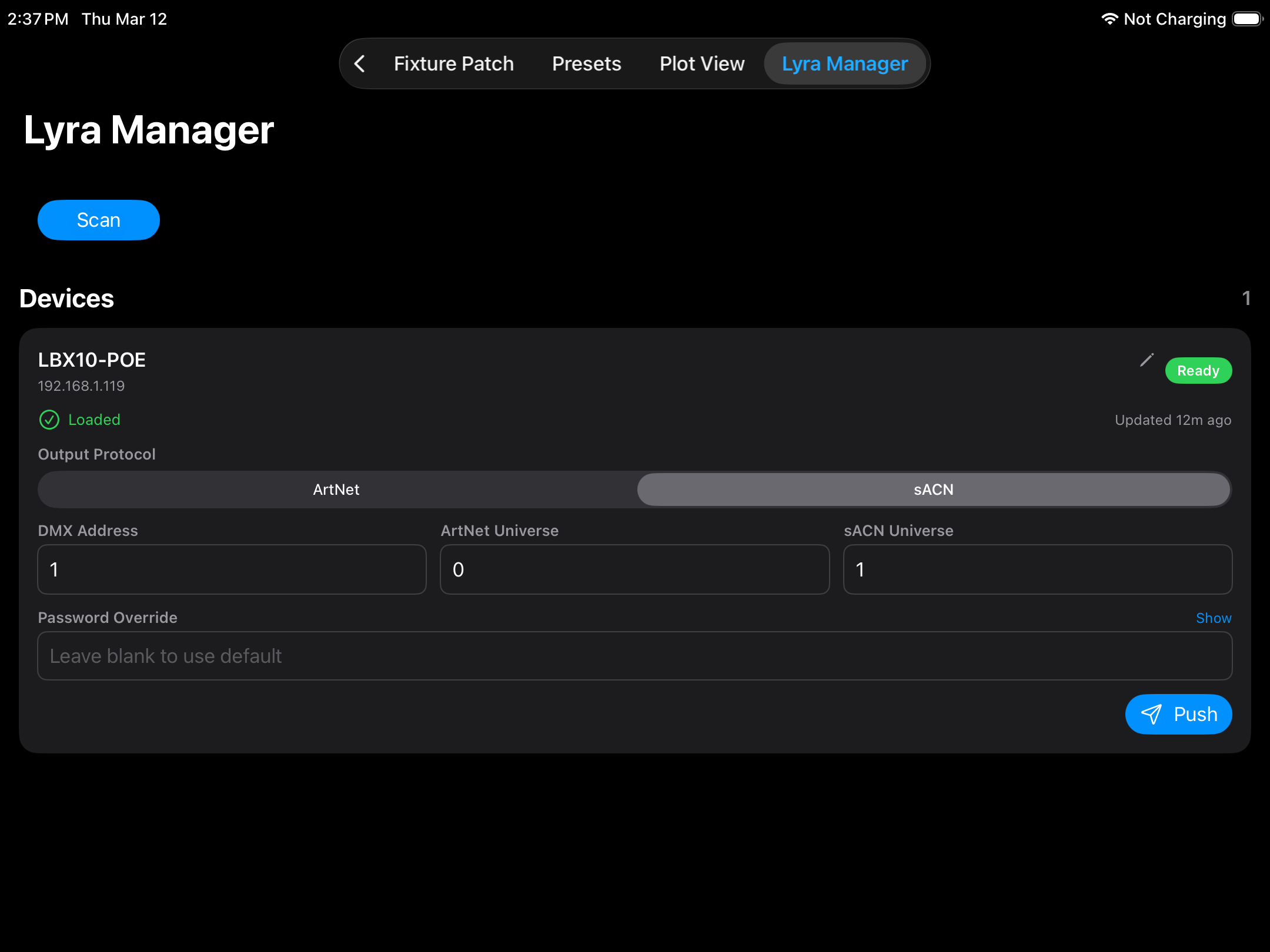
Lyra Manager
If you're running Ikan Lyra PoE fixtures, this tab keeps everything in sync. Spot drift before it becomes a problem on air, and get every light back to its correct configuration in a single tap.
Built for real productions
Every detail is designed for podcast studios, broadcast studios, and corporate spaces that need consistent, repeatable lighting without a dedicated lighting person on staff.
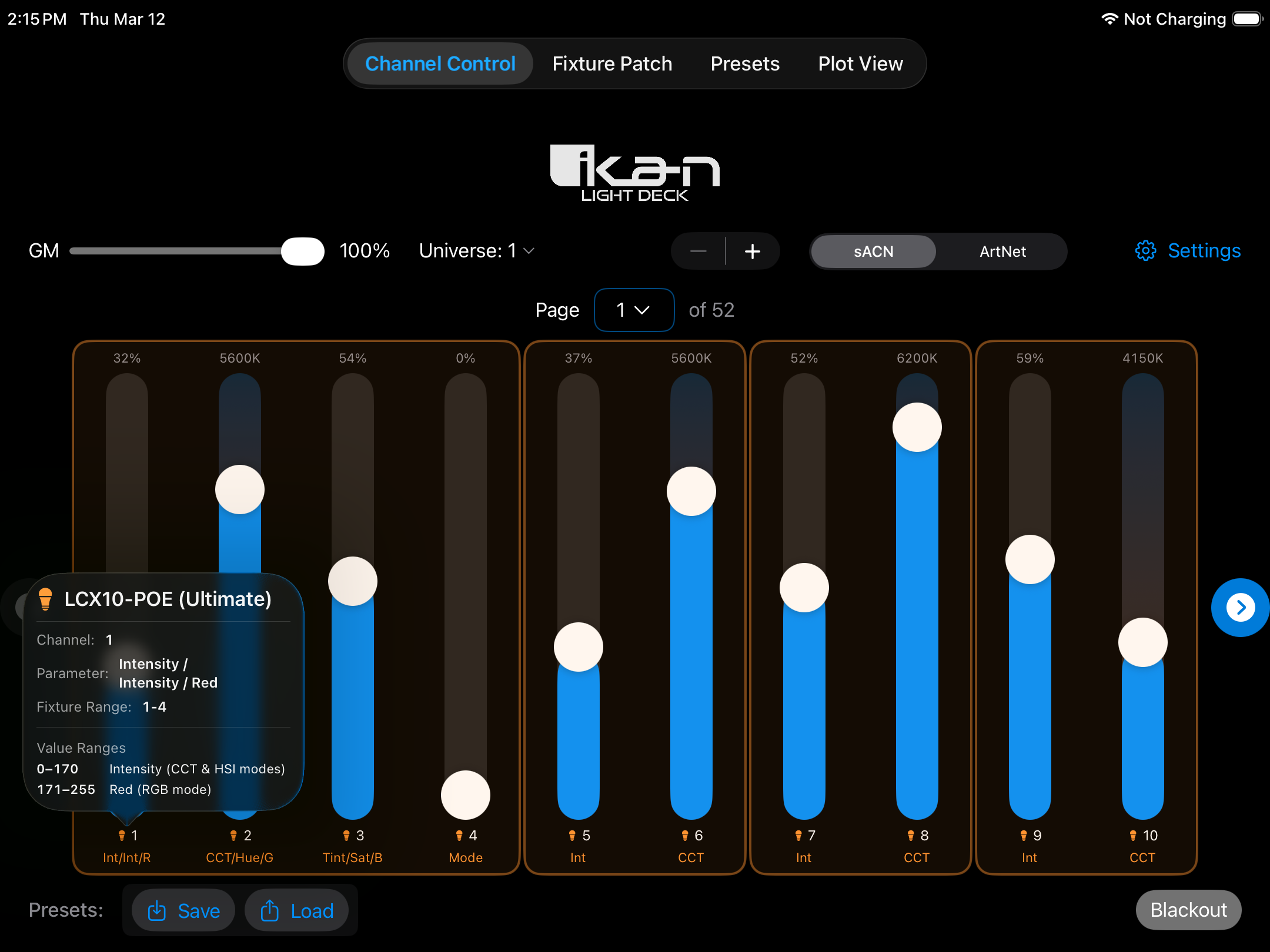
Touch-optimized DMX faders
Every channel gets a tall vertical fader built for touch and optimized for quick, precise adjustments. Values show as 0–255 or percentage, your call. CCT channels get a warm-to-cool gradient so you can see the color shift at a glance.
- Up to 512 individually addressable DMX channels
- Display values as raw DMX (0–255) or percentage
- CCT gradient fader with Kelvin or DMX readout
- Quick-set popover for jumping to exact values
- Fader Link Groups: group multiple channels so they always stay in sync
- Multi-universe support across pages
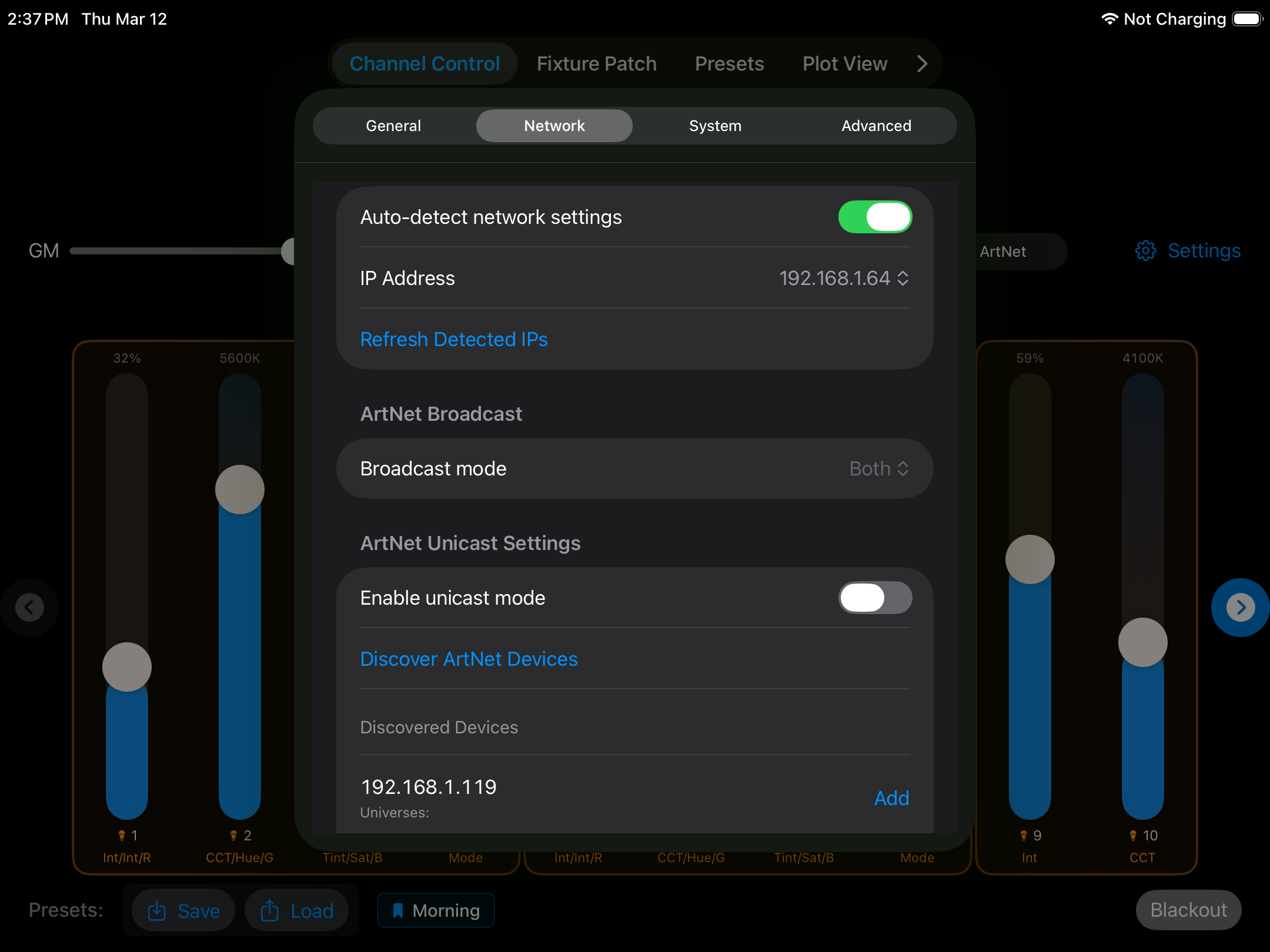
ArtNet & sACN, your way
Light Deck supports both ArtNet and sACN (E1.31), the two most common DMX-over-IP protocols used in studios today. Switch between them in one tap, set your universe, and you're sending. Both protocols support the full range of network configurations your setup may require.
- ArtNet (UDP 6454) with universe selection across 0–511
- sACN / E1.31 with universe selection across 1–512
- ArtNet broadcast modes: Both, Directed, and Limited
- sACN multicast support for clean network segmentation
- Unicast mode with per-fixture IP targeting (both protocols)
- One-tap ArtNet device discovery on the local network
- Auto-detect or manual IP assignment
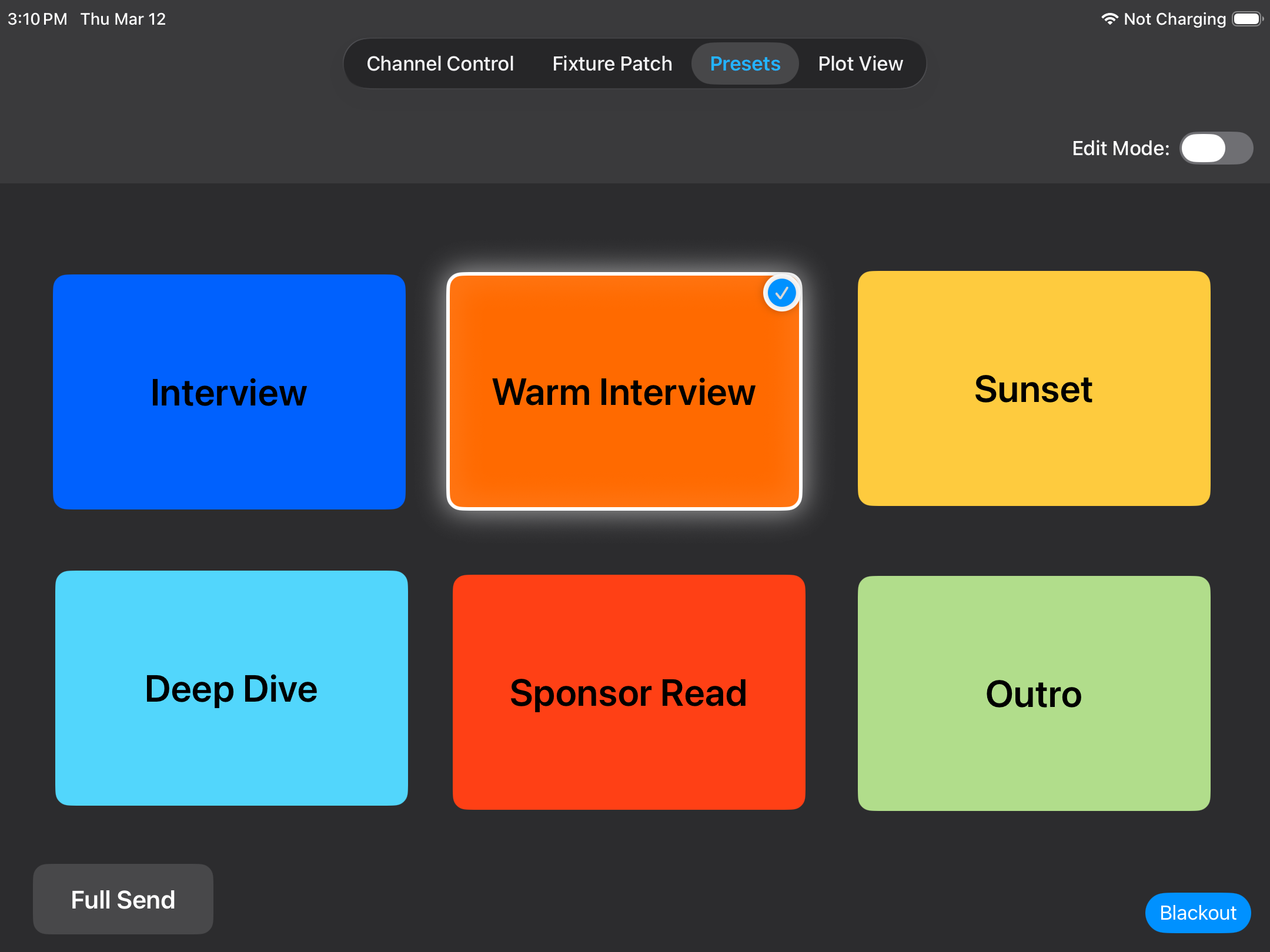
Save any look. Recall it instantly.
Snapshot the entire DMX state into a named preset, then arrange your presets on a fully customizable button board. Add custom colors, upload background images, and position buttons exactly where you want them.
- Unlimited presets per configuration
- Custom button colors, images & text alignment
- Free-position drag-and-drop canvas layout
- Rename or delete presets without losing others
- Preset Overlays for zone-based layering (enabled in Advanced settings via Plot View)
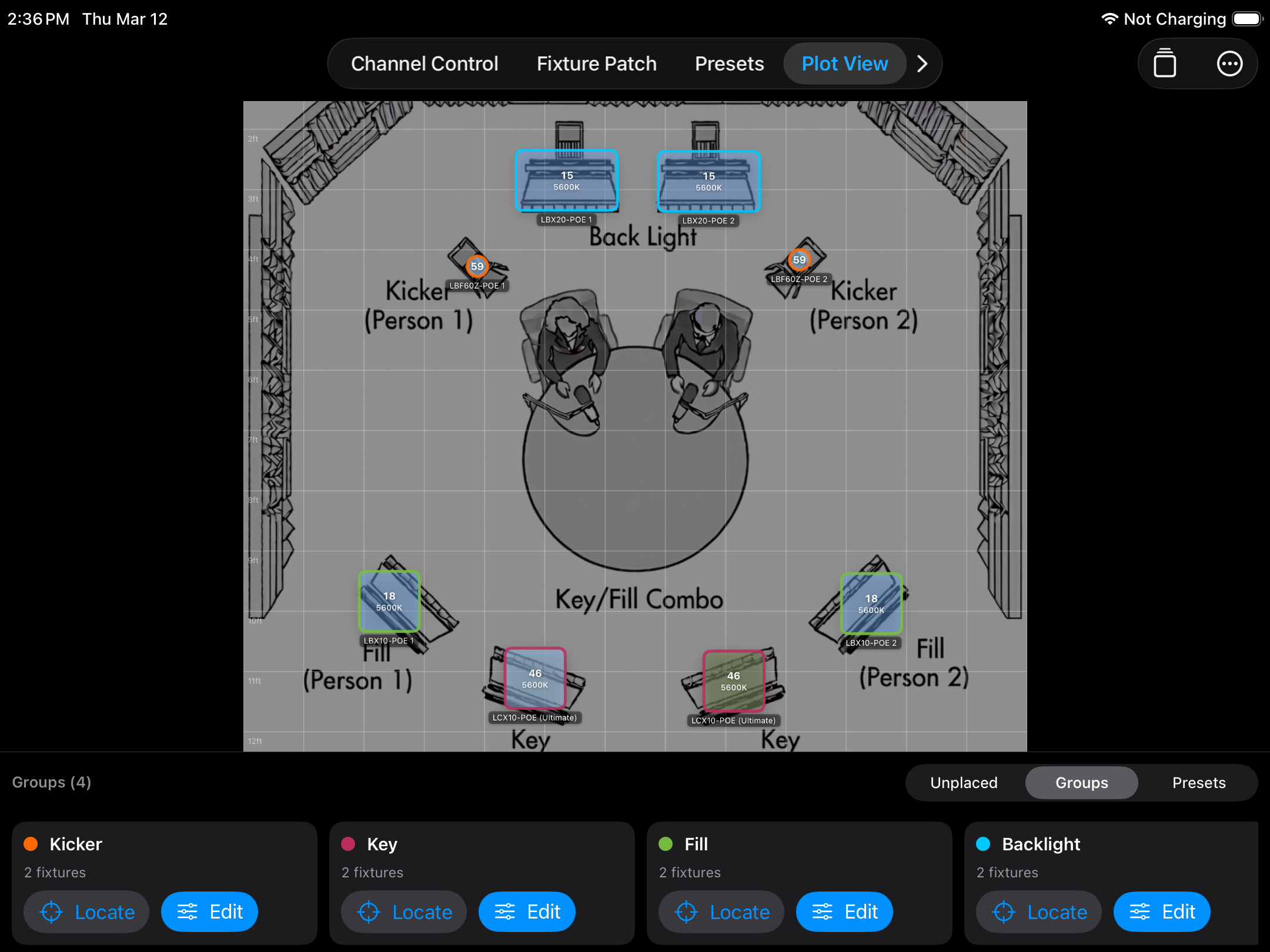
See your rig. Control by zone.
Place fixtures on a visual stage plot, group them into named zones, and control whole sections with master sliders. CCT offsets let you compensate for fixture-to-fixture variance without touching individual channels.
- Drag-and-drop fixture placement on a stage canvas
- Named fixture groups with per-group color coding
- Intensity master and per-fixture multipliers per group
- CCT master (Kelvin) and per-fixture CCT offsets
- Color controls reflect true fixture values: intensity, color temperature, and hue adjust as the light actually behaves
- Preset Overlays — layer presets by zone and control type
Ikan Lyra PoE: zero guesswork
Light Deck goes beyond sending DMX: it actively monitors every Ikan Lyra PoE light on your network, compares their live configuration against what you've set, and flags drift before it becomes a problem on camera.
- Automatic discovery of Lyra devices on the network
- Expected vs. actual config comparison per device
- One-tap sync for any drifted device
- Optional auto-sync when protocol or universe changes
- Chronological sync log for auditing and support
Patch any fixture
Light Deck comes ready to go with Ikan lights built in. Getting other fixtures patched is just as easy.
🏷️ Ikan Lights Built In
Ikan Lyra and other Ikan fixtures are included in the library out of the box. Plug in, patch, and start controlling without any setup.
📥 GDTF Import
Import any .gdtf file to add manufacturer-provided fixture definitions with accurate channel layouts, mode support, and channel naming.
✏️ Manual Fixture Entry
Don't have a GDTF file? Build a fixture from scratch by entering the channel count and naming each channel yourself.
🔧 Smart Channel Names
Patched fixtures label their faders automatically (Intensity, CCT, Red, Green, Blue) so your team always knows what each fader does without counting channels.
🔗 Visual Channel Grouping
When a fixture uses multiple channels, Light Deck groups them together with a visual highlight so you can instantly tell which channels belong to the same light — no counting, no guessing.
Everything under control
Four settings tabs keep configuration tidy and out of the way during shows.
⚙️ General
Choose ArtNet or sACN, set the target universe, toggle percentage vs. DMX value display, and pick your default CCT display mode (Kelvin or DMX).
🌐 Network
Auto-detect your network interface or lock to a specific IP. Configure ArtNet broadcast mode and manage unicast target IPs with one-tap device discovery.
💾 System & Backup
Export your entire setup — fixtures, presets, DMX levels, and Lyra settings — as a JSON file. Restore from backup on any device, or reset programming without losing settings.
🔬 Advanced
Enable or hide the Plot View tab, turn on Preset Overlays, and toggle Lyra Manager access. Keeps the UI clean for operators who don't need every feature.
Download free. Upgrade when you're ready.
Light Deck is free to download with a 4-channel. When you're ready, one purchase unlocks everything permanently. No subscription, no renewal.