

If you’re a system integrator, you’ve had this conversation at least once in the last year…
A client wants a studio in a room that was never designed for one. A conference room, a training space, a converted office with drop ceilings and no dedicated electrical infrastructure.
Traditional studio lighting means you’re scoping dedicated circuits, coordinating an electrician, running conduit, and — in education, government, or leased corporate spaces — pulling permits that can delay a project by months. The fixtures aren’t the problem. The infrastructure those fixtures require is the problem.
PoE studio lighting changes that deployment model. Power and control travel over a single Cat6 cable. No electrician. No conduit. No permits in most jurisdictions. The fixtures become IP devices on the network, controllable through the same platforms your AV team already manages.
This guide covers the deployment model, the architecture requirements, the tradeoffs against traditional lighting, and a commissioning checklist you can use on your next project. For a broader introduction to PoE lighting technology, see our complete PoE lighting guide.
What PoE lighting actually means in a studio deployment
This isn’t a networking tutorial. As an SI, what you need to know about power over ethernet lighting is what it changes about the way you scope, install, and support a studio project.
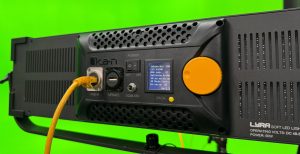
The core shift: a single Cat6 cable delivers both DC power and control data to each fixture. That eliminates the AC power run, the dedicated circuit, the junction box, and the separate DMX cable. In a traditional studio lighting deployment, each fixture requires roughly 2.5 cables — power in, power out (daisy-chained), and DMX. With PoE, it’s one cable per fixture, home-run to a managed switch.
The control protocol advantage matters here. PoE studio lights communicate via DMX-over-IP — specifically Art-Net and sACN, both standard broadcast control languages. These protocols now travel over the same network infrastructure as your video streams and control signals, which means the lighting layer integrates directly into IP-based production workflows without a standalone DMX console or separate control universe.
The management advantage follows naturally: each fixture is an addressable IP device. Centralized control, remote monitoring, firmware updates, and diagnostic data all run over the same network connection that powers the light. For multi-room or campus deployments, this is the difference between managing lights room-by-room and managing them from a single pane of glass.
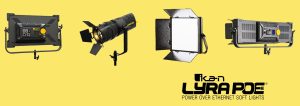
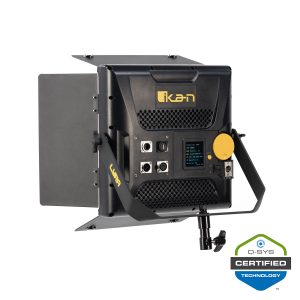
In practice, Ikan’s Lyra PoE LBX8-POE delivers 50W via a single PoE++ (802.3bt) connection, operates bi-color across 3200K–5600K, and supports Art-Net, sACN, and DMX-over-IP. It’s controllable natively within Q-SYS through a certified plugin. The LBX10-POE steps up to 85W with the same control stack, while the LBX20-POE delivers 170W using dual PoE++ connections for larger studio environments. Every fixture in the line maintains 97 CRI across the full color temperature range.
Why broadcast SIs are making the switch: 5 deployment drivers
1. Reduced permitting friction
No dedicated electrical circuit means no electrician in most jurisdictions, which means no permit application, no inspection scheduling, and no project delay while you wait for municipal approval. This is the single largest timeline compression PoE lighting delivers.
The impact compounds in environments with strict building regulations. K-12 schools, government facilities, universities, and leased corporate spaces all present permitting challenges that can stall a traditional studio build for months. Gwinnett County Public Schools in Georgia is deploying over 40 broadcast studios across their district using PoE lighting — without pulling a single electrical permit at any location. The University of Missouri installed a complete broadcast studio during a five-day Thanksgiving break in a facility with no existing ceiling power infrastructure — no permits, no electrical work, fully operational before classes resumed.
2. Simplified vendor management
A traditional studio lighting deployment involves an electrician (or electrical contractor), a low-voltage cabling contractor, a lighting vendor, and possibly a DMX control vendor. PoE consolidates the infrastructure layer: one cable type, one switch vendor, one control protocol. The SI manages fewer subcontractors, fewer coordination handoffs, and fewer finger-pointing opportunities when something goes wrong.
Switch bundles — like the Ikan + Netgear PoE++ packages that pair fixtures with a pre-matched 802.3bt switch — further simplify procurement by eliminating the switch-selection step entirely.
3. Repeatable, controllable output
Scene presets stored in the control system mean every production session starts with identical lighting conditions. This is the consistency argument that matters to clients with non-technical operators: the CEO’s town hall looks the same every time, regardless of which staff member presses the button. Manual lighting setups introduce session-to-session variation that undermines brand consistency and generates client complaints.
4. Future-proof control architecture
IP-native lighting integrates directly with IP-native video workflows. NDI cameras, Q-SYS control systems, and PoE lighting all live on the same network infrastructure and speak the same management language. The lighting layer doesn’t require a separate DMX universe, a standalone lighting console, or a dedicated control bus. As clients expand their production capabilities, the lighting architecture scales without rearchitecting.
5. Reduced post-install service load
Scene presets remove user error from the lighting equation. When the client’s AV team can recall a saved configuration rather than manually adjusting intensity and color temperature per fixture, the number of “the lighting looks different today” service calls drops significantly. Remote monitoring and diagnostic access further reduce truck rolls for troubleshooting.
PoE lighting architecture: what has to be true for it to work
If you’re evaluating PoE lighting for a client project, these are the infrastructure requirements and design considerations that determine whether it’s a fit.
Switch requirements. PoE studio lighting requires PoE++ (802.3bt) switches to deliver sufficient wattage to higher-output fixtures. Standard PoE (802.3af) and PoE+ (802.3at) switches will not power most broadcast-grade fixtures. Ikan offers pre-matched switch bundles — fixtures paired with Netgear Ultra90 PoE++ 802.3bt switches in 380W and 720W configurations — which simplify procurement and eliminate compatibility guesswork. If you’re specifying your own switch, confirm 802.3bt compliance and verify the per-port wattage rating against the fixtures you plan to deploy.
Cable run limits. Standard Cat6 cable runs are subject to the IEEE distance limitations for PoE delivery. Plan fixture positions and switch locations accordingly, and verify that existing cable infrastructure (if being reused) meets the current category rating for the power draw you’re specifying. [Editor: verify specific IEEE 802.3bt distance spec before publish.]
Network segmentation. AV and lighting network traffic should be segmented from corporate IT traffic. This is standard practice for any IP-based AV deployment, and it applies equally to PoE lighting. VLAN configuration isolates broadcast control traffic and prevents lighting control packets from competing with corporate data on the same network segment.
Power budget planning. Each fixture draws a defined wattage from the PoE switch. A five-light studio using LBX8-POE fixtures (50W each) requires 250W of PoE budget; the same studio with LBX10-POE fixtures (85W each) requires 425W. Calculate total fixture wattage against your switch’s PoE power budget before finalizing the design, and leave headroom for any non-lighting PoE devices (cameras, monitors) sharing the same switch. [Editor: confirm these wattage figures against current product specs.]
Control protocol selection. Art-Net and sACN are both IP-based DMX protocols supported by the Lyra PoE line. Art-Net is more widely deployed in broadcast environments and works well for single-universe installations. sACN (Streaming ACN / E1.31) handles multi-universe deployments more efficiently and is the standard in larger-scale architectural and theatrical installations. For most corporate studio deployments, either protocol works. The Q-SYS plugin supports both, with automatic protocol switching as of plugin version 1.1.
Control and automation: why PoE pairs naturally with Q-SYS
If your clients already have Q-SYS infrastructure — and a large percentage of corporate AV environments do — PoE lighting integrates into their existing control ecosystem without adding a separate lighting controller, a separate management interface, or a separate training requirement for their AV team.
Ikan’s certified Q-SYS plugin allows control of light intensity and color temperature for up to 256 fixtures per universe directly within Q-SYS Designer. The fixtures appear as native components in the Q-SYS environment — drag and drop into the design, assign to control surfaces, and include in snapshot presets alongside audio, video routing, and camera positions.
The practical implication for SIs: lower programming complexity, lower support burden, and a single control system for the client’s team to learn. For non-technical operators, this means lighting scenes can be triggered by the same button press that sets camera positions and audio levels. One preset activates the entire studio. For a deeper walkthrough of how this works, see the Q-SYS integration for studio control guide, and for how this enables one-button operation for non-technical teams, see Article 9 in this series.
Autodesk’s deployment is a concrete example: their engineering teams leveraged existing Q-SYS infrastructure to add broadcast-quality PoE lighting across multiple offices. IT staff already comfortable with Q-SYS configured the lighting without learning a new system. The same touch panels controlling conference room displays now managed studio illumination — unified training, consistent interfaces, leveraged expertise.
PoE vs. traditional lighting: a decision table for SIs
This is not a universal superiority claim. PoE lighting changes the deployment model in ways that matter for specific project types. Traditional AC+DMX lighting still has a place, particularly in purpose-built facilities with existing electrical infrastructure. The table below is a genuine tradeoff analysis — use it to advise clients accurately.
| Evaluation dimension | Traditional AC + DMX | PoE + IP control |
|---|---|---|
| Electrical work required | Yes — licensed electrician, dedicated circuits | No — standard IT infrastructure |
| Permitting friction | High (especially in K-12, government, leased spaces) | Low to none in most jurisdictions |
| Cable runs | Separate power + DMX cables (~2.5 per fixture) | Single Cat6 cable per fixture |
| Control integration | Requires DMX controller or console | Native IP control (Art-Net, sACN, Q-SYS plugin) |
| Scene/preset management | DMX board or standalone lighting controller | IP-addressable; managed via Q-SYS or software |
| Reconfiguration flexibility | Limited by conduit and circuit locations | High — move a light, plug into any PoE port |
| Troubleshooting skill set | Electrical + lighting | Networking + lighting |
| Typical install time | Longer (electrical coordination required) | Shorter (IT infrastructure often exists) |
| Best fit | Purpose-built broadcast facilities with existing infrastructure | Corporate, education, government, retrofit environments |
| Limitations | High cost of change, permit-dependent timelines | Requires PoE++ switches; power budget planning required |
What lighting specs mean for broadcast outcomes
If your client asks what these numbers actually mean for on-camera quality, use this translation table:
| Spec | What it means | Why it matters for corporate video |
|---|---|---|
| CRI 97 | Color Rendering Index — how accurately the light renders colors compared to sunlight | Accurate skin tone reproduction; subjects don’t look orange, gray, or washed out on camera |
| Bi-color 3200K–5600K | Adjustable from warm (tungsten-like) to cool (daylight-like) color temperature | Match ambient conditions; maintain a consistent look across sessions regardless of time of day |
| 110° beam angle | Wide, soft spread of light from the fixture | Soft shadows, flattering on-camera appearance without hard edges on the subject |
| Art-Net / sACN | IP-based DMX control protocols | Integrates with Q-SYS and other AV control systems without a separate DMX console |
| Low-profile fixture design | Shallow form factor (e.g., LBX8-POE is 1.9″ deep) | Fits in rooms with low or drop ceilings without clearance issues |
Deployment checklist for SIs
Use this on your next PoE studio lighting project. It covers the full lifecycle from pre-design through post-install support.
Pre-design
- Confirm PoE++ (802.3bt) switch availability or plan procurement
- Calculate total fixture wattage against switch power budget
- Confirm Cat6 infrastructure is in place or plan cable runs
- Identify control protocol requirement (Art-Net, sACN, DMX-over-IP, Q-SYS)
- Check permitting requirements for the specific jurisdiction and facility type
Design and specification
- Map fixture positions relative to network port locations
- Plan network segmentation for AV/lighting traffic (VLAN configuration)
- Specify fixture CRI — 97 CRI minimum for broadcast-quality skin tone rendering
- Specify bi-color range appropriate for the use case (3200K–5600K covers most corporate environments; 2700K–6500K available in fresnel models for wider range)
- Document preset and scene requirements with the end-user — map show types to operator skill level
Commissioning
- Assign IP addresses and verify network connectivity per fixture
- Program scene presets to match defined show types
- Test scene recall under live production conditions (not just in programming mode)
- Document all IP addresses, presets, and credentials for client handoff
- Conduct operator training session — record the session for future staff onboarding
Post-install support
- Verify remote access path for firmware updates
- Establish escalation path for network-layer issues (clarify IT team vs. AV team ownership)
- Provide client with a “first responder” guide covering common operator issues and reset procedures
Request a PoE lighting deployment consult — get expert design support for your next project.
Is PoE lighting right for this project? Three decision scenarios
Scenario 1: Corporate conference room converted to a studio
The room has network drops, a drop ceiling, and no dedicated electrical for lighting. The client’s AV team — not broadcast engineers — will operate the studio. Budget doesn’t include an electrician or months of permitting lead time.
Recommendation: Strong PoE fit. The existing network infrastructure handles power and control. Scene presets let non-technical operators produce consistent output. No permits, no electrical work, operational in days rather than months. This is the use case PoE lighting was built for.
Next step: Audit the room’s existing network infrastructure and ceiling height. Spec a switch bundle that covers your fixture count with power budget headroom. For the full room-qualification framework, see the complete corporate studio planning framework (Article 1 in this series).
Scenario 2: New-build dedicated broadcast facility with full electrical scope
The facility is being designed from scratch with a dedicated electrical scope. An electrician is already on the project for other build requirements. High-wattage fixtures and existing DMX expertise are in play.
Recommendation: Traditional or hybrid. The permitting advantage of PoE is less decisive when electrical work is already in scope. Choose based on control system preference and long-term flexibility needs. If the client is on Q-SYS and values centralized IP control, PoE still delivers architectural advantages even when the permitting argument is neutral. If the facility has existing DMX infrastructure and operators trained on traditional lighting consoles, a hybrid approach — PoE on new fixtures, DMX on legacy gear — may make more sense.
Next step: Map the control architecture first. If Q-SYS is the platform, PoE fixtures integrate natively and simplify the control design. If a separate lighting console is already specified, evaluate whether the IP control advantages justify the switch.
Scenario 3: Multi-room campus deployment (K-12, university, or enterprise)
The organization needs standardized broadcast studios across multiple rooms, buildings, or sites. Permitting per location would compound delays and costs across every site. Centralized management and remote support are priorities.
Recommendation: Strong PoE fit. Every deployment advantage compounds at scale. No permits across 10, 20, or 40+ locations means months of cumulative time savings. Standardized switch-and-fixture configurations create repeatable BOMs. IP-addressable fixtures enable centralized monitoring and remote firmware updates across the entire deployment. Gwinnett County’s 40+ school rollout is the model here — standardized configuration, zero permits, scalable and repeatable.
Next step: Pilot one or two rooms with a standardized configuration. Validate the design, document the BOM and commissioning process, then scale. For the full planning approach, start with the complete corporate studio planning framework.
Frequently asked questions
Do I need a licensed electrician to install PoE lighting?
In most jurisdictions, no. PoE lighting runs on low-voltage DC power delivered through standard Cat6 cabling, which is classified as low-voltage data infrastructure rather than electrical work. The cable runs fall under the same category as network cabling, not AC power wiring. That said, local regulations vary — verify with the specific jurisdiction before committing to a scope of work that excludes an electrician.
Is PoE lighting bright enough for broadcast-quality studio output?
Yes. Ikan’s Lyra PoE fixtures range from 50W to 170W, with tungsten-equivalent output ranging from 500W (LBX8-POE) to 1000W (LBX20-POE). All maintain 97 CRI across the full bi-color range, which is the threshold for accurate skin tone rendering on camera. These are broadcast-grade fixtures, not repurposed architectural lights.
Can PoE lighting integrate with existing DMX infrastructure and Q-SYS?
Yes. The Lyra PoE line supports Art-Net and sACN (both DMX-over-IP protocols) as well as traditional DMX512 via 5-pin XLR on select models like the LBX10-POE. The certified Q-SYS plugin provides native control within Q-SYS Designer, with automatic protocol switching between Art-Net and sACN as of version 1.1.
What’s the difference between Art-Net and sACN, and which should I specify?
Both are IP-based DMX transport protocols. Art-Net is more widely deployed in broadcast and production environments, handles single-universe installations efficiently, and is the default for most corporate studio projects. sACN (E1.31) is better suited for multi-universe deployments and larger-scale installations where universe management and priority handling matter. For a typical corporate studio with fewer than 256 fixtures, either protocol works. The Q-SYS plugin supports both.
Is PoE lighting reliable enough for mission-critical live broadcasts?
PoE lighting is deployed in active production environments across education, corporate, and broadcast facilities. The power delivery is managed by enterprise-grade PoE++ switches with UPS backup capability — the same infrastructure supporting other mission-critical IP devices. Scene presets eliminate the human-error variable that causes inconsistency in manual lighting setups, which actually improves reliability compared to operator-dependent configurations.
What switch do I need for PoE studio lighting?
A PoE++ (802.3bt) managed switch with sufficient per-port wattage and total power budget for your fixture count. Ikan offers pre-matched bundles with Netgear Ultra90 PoE++ 802.3bt switches in 380W (unmanaged, for smaller deployments) and 720W (managed, for larger deployments or when VLAN segmentation is required) configurations. If specifying your own switch, confirm 802.3bt compliance and calculate total fixture wattage against the switch’s PoE power budget.
Key takeaways
- PoE lighting changes the deployment model, not just the fixture. The value is in eliminating electrical infrastructure, permitting friction, and multi-vendor coordination — not in the light output alone.
- The permitting advantage compounds at scale. One room saved from a permit cycle is convenient. Forty rooms saved from permit cycles is a fundamentally different project timeline.
- IP-native control integrates with existing AV ecosystems. If the client is on Q-SYS, PoE lighting becomes part of their existing control environment via a certified plugin — no new systems to learn.
- Not every project is a PoE project. Purpose-built facilities with full electrical scope may not benefit from the permitting advantage. Choose based on control architecture and long-term flexibility, not just cable simplification.
- The deployment checklist is your scoping tool. Use the pre-design, design, commissioning, and support phases to structure client conversations and project proposals.
Ready to scope your next PoE studio project? Request a deployment consult — our team can support switch selection, fixture specification, and control system integration for your client’s specific environment.